For three years the Orange España Livebox 6 sat on a shelf in my network closet doing exactly one useful thing: converting light into Ethernet. Everything else it did was in the way. It was a second router in front of my UniFi UDM Pro Max gateway (double NAT), it ran its own Wi-Fi radios whether I wanted them or not, and one week in August I caught it broadcasting a copy of my IoT SSID outside my firewall. On 2 November 2026 I pulled the fiber out of it and plugged it into a second-hand Huawei HG8310M, a 15 euro optical network terminal (ONT) with no router inside at all. It took 42 minutes from first lost ping to a working public lease, and the Livebox is now in a drawer.
This post is the write-up I wished existed when I started: what Orange España actually requires on the wire, what you must copy from the Livebox before you unplug it, which ONT to buy, and the one setting that is wrong in most of the forum guides.
One scope note before anything else: this is for a line on Orange’s own fiber network (what the forums call fibra directa). If your Orange service is delivered over Movistar’s plant as an indirect NEBA or VULA line, the ONT registration uses the hex form of the password and some details below will differ.
Should you do this at all?#
Probably not, unless something about the Livebox is actively bothering you. I want to be honest about the size of the win, because the forums are not.
What you gain:
- One router instead of two, so port forwards are a single hop and NAT loopback works.
- No ISP-controlled device inside your perimeter. No TR-069 remote management, no surprise firmware, no radios you did not turn on.
- A server closet shelf with a lot more space. This was my number one reason!
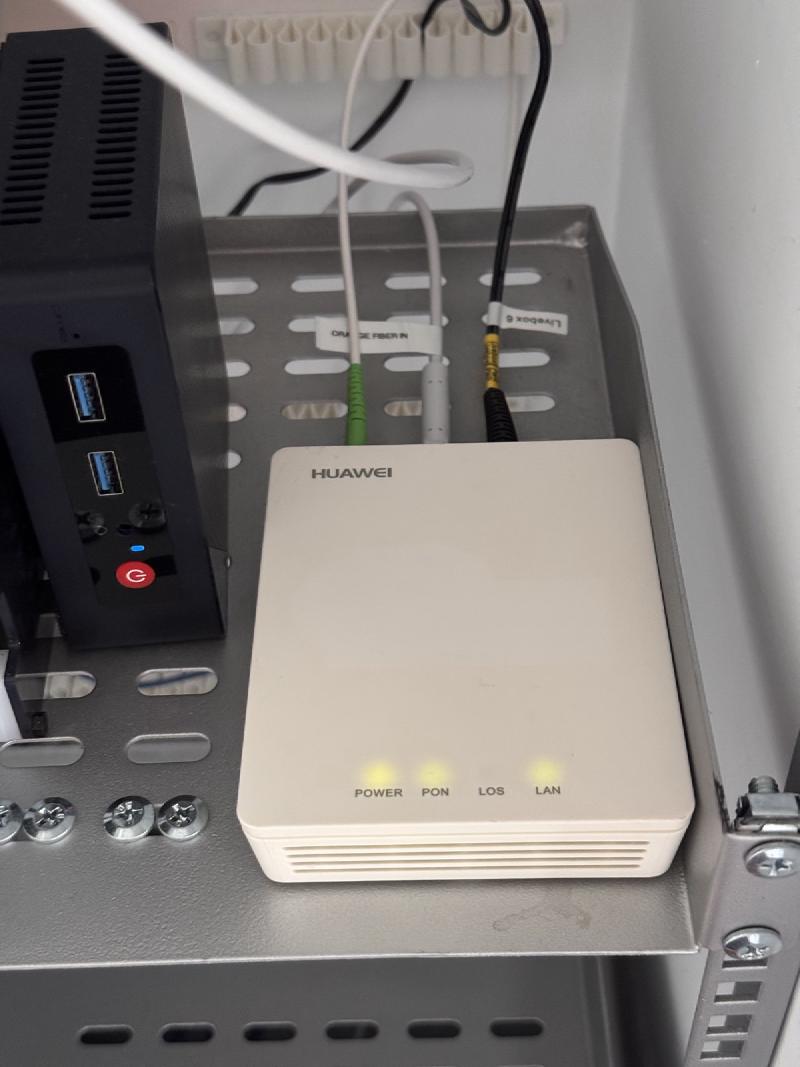
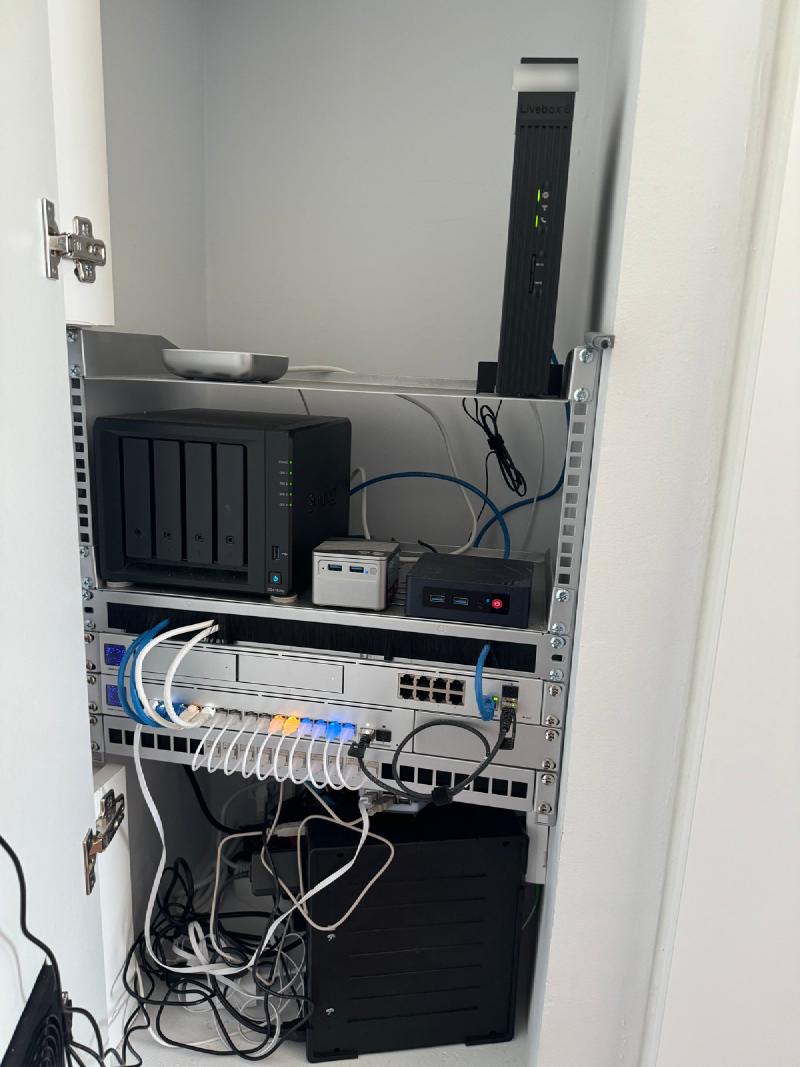
What you lose:
- The landline. Orange has blocked third-party SIP registration since about 2019. If you use the fixed phone, stop here.
- First-line support. Expect Orange to ask you to plug the Livebox back in before they will look at anything. Keep it; it is their property and you return it when you cancel.
- Firmware updates and remote diagnostics on the ONT side. The HG8310M you buy second-hand runs whatever it runs.
- Orange TV, only IF you use their separate DECODER BOXES. You’re fine if you watch Orange TV using Orange’s app on your TV, Apple TV, etc.
You keep Orange TV, if you watch it through the app. This is the question that stops most people, and it is a decoder problem, not a network problem. The physical Orange decoder needs multicast IPTV on a second VLAN (838) delivered to a dedicated router port, and that is fiddly on any third-party router. The Orange TV app on an Apple TV or a phone is plain HTTPS streaming and does not care what is upstream. Orange sells the same app to Digi and Movistar customers as “Orange TV Libre” (a Digi user on bandaancha confirmed in 2024 that the decoder fails off-net with error S80 while the app works fine outside the Orange network): the app cannot depend on an Orange router. We have no decoder, so nothing changed.
The speed is a wash. My 53-day baseline on the Livebox was a median of 869 Mbps down and 893 up. The Huawei’s first test was 837 down, 840 up. That is inside normal variation for the hour of day, and the point of the exercise was never speed.
What does Orange España actually need from your equipment?#
Three things, and the answer is simpler than the guides make it look.
- A GPON ONT registered with your line’s PLOAM password. This is a 10-character string that identifies your subscription to the optical line terminal (OLT) in the exchange. The Livebox management UI has it and you copy it to the new ONT.
- Internet traffic tagged VLAN 832, 802.1p priority 0, plain DHCP. No PPPoE, no username, no DHCP options. Your router’s WAN port does the tagging.
- That is all. No MAC cloning was needed on my line. The public IP stayed the same before and after, which tells you Orange ties the lease to the PLOAM credential and not to the hardware.
The (Orange) French Disconnection#
Now the trap if you research how to do this online: Orange France also uses VLAN 832, and the French guides outnumber the Spanish ones ten to one. But the setup is different for France than in Spain!
France needs 802.1p priority 6 and DHCP options 60, 77 and 90 carrying an fti/ account identity. Spain needs none of that. If a guide mentions fti/, option 90 or CoS 6, it is French, and following it will fail. Orange España’s requirement is strictly the easier one.
Which ONT should you buy?#
The one that matches the OLT vendor in your area, and the problem is that you cannot find that out remotely. A mismatched ONT does not fail outright; it registers and then runs slowly, which is the worst possible failure to debug. Reports on bandaancha.eu document Nokia ONTs on ZTE plant dropping from 600/600 to roughly 300/86 Mbps.
| OLT vendor in your area | ONT to buy |
|---|---|
| Alcatel-Lucent / Nokia (older Orange deployments) | Nokia G-010G-P |
| ZTE (ex-Jazztel plant) or Huawei | Huawei HG8310M or HG8010H |
Both are 10 to 15 euros second-hand on Wallapop. I bought one of each as a hedge and the Huawei worked first, so the Nokia is still in its box. The HG8310M choice came from a bandaancha thread from April 2026 where a user got it working on Orange España, television included. Avoid the ZTE F601 (documented failures on Orange direct fiber with correct settings) and the Ubiquiti UFiber Loco (its PLOAM field is the wrong length for some Liveboxes).
You also need a fiber patch cable only if the one in the wall does not reach. It is SC/APC, the green angled connector, single-mode. Not the blue SC/UPC.
What do you copy from the Livebox before you touch anything?#
Three values, all in the Livebox admin UI at 192.168.1.1:
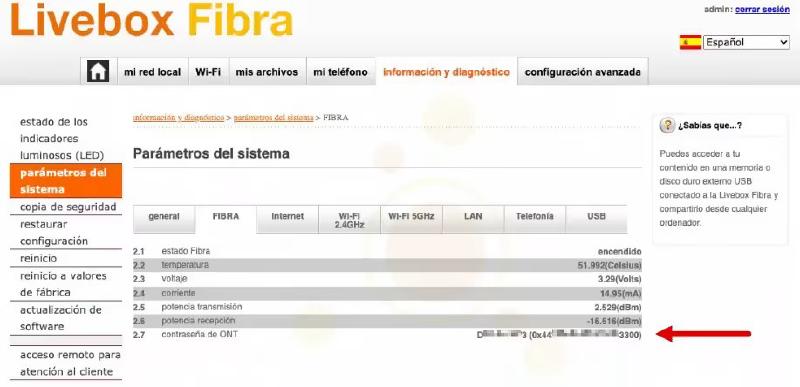
- The PLOAM password. Información y diagnóstico > Parámetros del sistema > FIBRA, row 2.7, “contraseña de ONT”. The Livebox shows it twice: the 10-character ASCII form, and the hex form in brackets starting
0x. Write down both exactly as shown. Some ONT firmwares want one form, some the other; the Huawei takes ASCII. The bandaancha thread on getting the GPON key out of the Livebox covers the older models and the edge cases. - The Livebox WAN MAC address. You probably will not need it, but if no lease arrives in 30 minutes, cloning it onto your router’s WAN is the first thing to try.
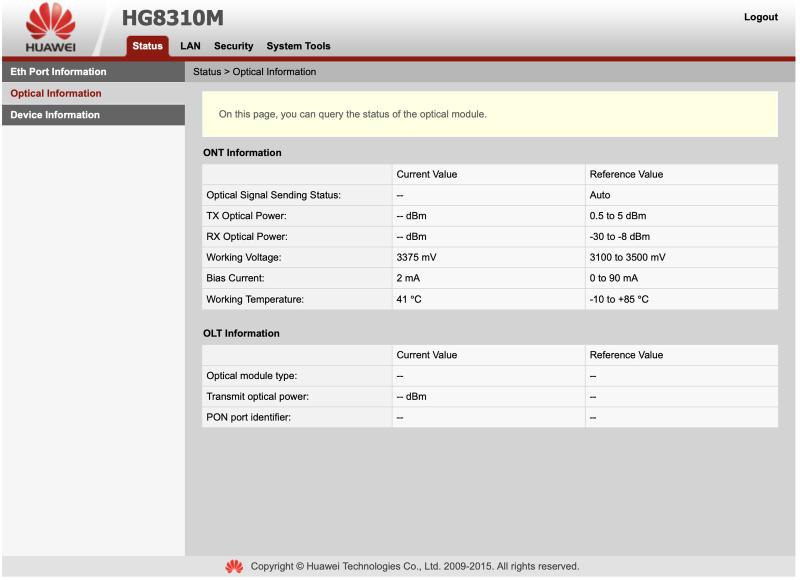
- The optical receive power. Same page, row 2.6, “potencia recepción”. Mine read -19.0 dBm. After the swap, a reading much worse than this on the new ONT means the connector, not the ONT.
How did I prepare before I started?#
- A laptop set to a static address for the ONT’s bench network.
- Fiber cleaning supplies (isopropyl alcohol and lint-free wipes, or a one-click cleaner) and dust caps for the Livebox optic and the wall pigtail.
- The UniFi console, an SSH window and the Livebox UI, all open before unplugging anything.
How do you configure the Huawei HG8310M?#
On the bench first, with the fiber still in the Livebox.
Connect a laptop to the Huawei’s single Ethernet port, give the laptop a static IP of
192.168.100.2/24, and browse tohttp://192.168.100.1.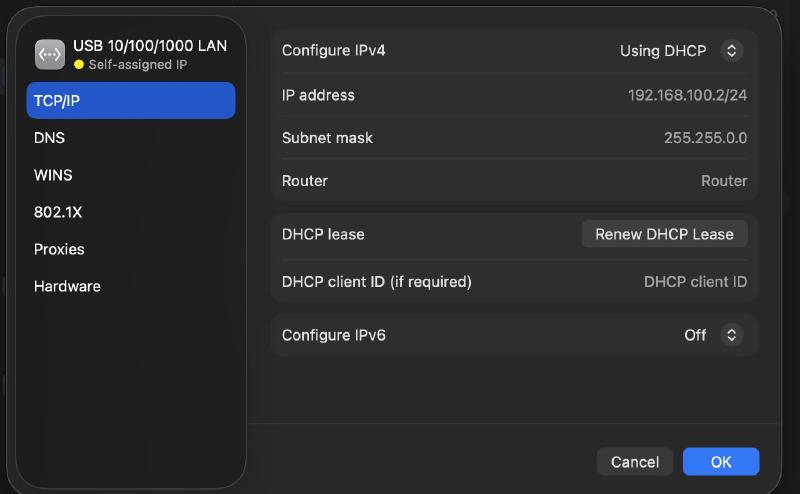
The bench setup: the laptop on a static 192.168.100.2 so it can reach the ONT’s web UI at 192.168.100.1. Log into the Huawei page. There are no credentials printed on the unit. The defaults are
telecomadmin/admintelecom, withroot/adminHGas the fallback (hack-gpon.org keeps the list for the whole HG80xx family, and maquinasvirtuales.eu has screenshots of the same web UI).
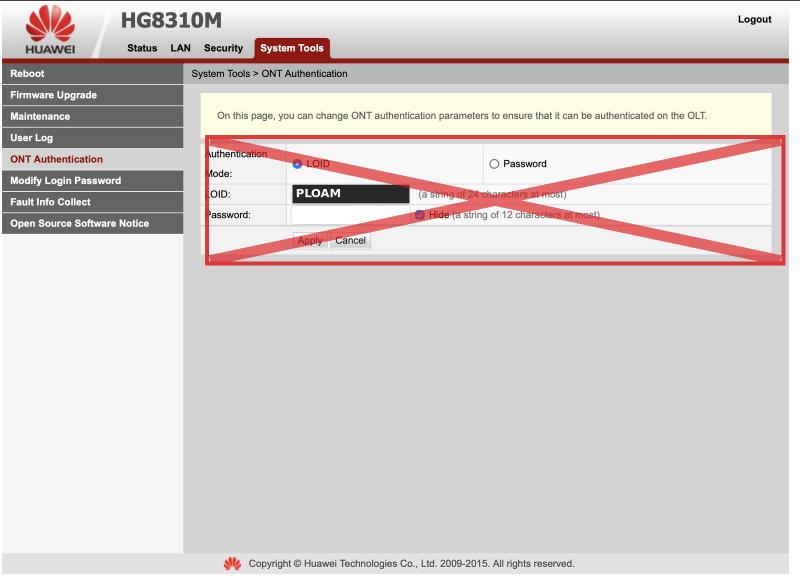
Set the ONT Authentication. Here is where I screwed up my first registration attempt, and where I think most of the Spanish guides are confusing.
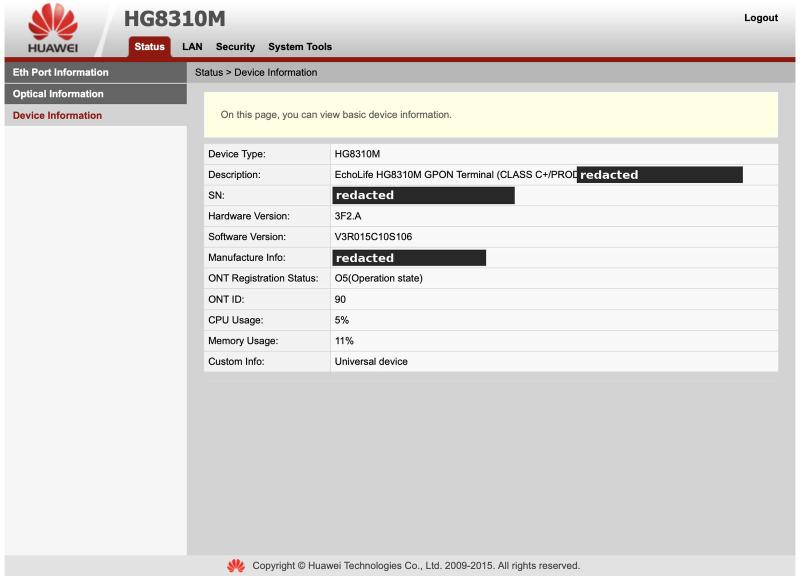
Set Authentication Mode to Password, enter the PLOAM in ASCII, apply, and reboot the ONT (System Tools > Reboot). Once I did this it went to O5 within about ten minutes of the fiber going in.
The first time I did this I screwed it up! I chose LOID instead of Password for the Authentication Mode because the forum guides say “enter the PLOAM” without saying which, and the PLOAM field under LOID is the obvious place to type a 10-character string. I did that. The ONT bounced between O3 and O2 for ten minutes: the OLT discovered it, then deactivated it. If you end up at O2, you probably made the same mistake I did. Do not keep retrying. Repeated failed registrations can get your PLOAM blocked at the OLT, and that takes the Livebox down too until Orange clears it.
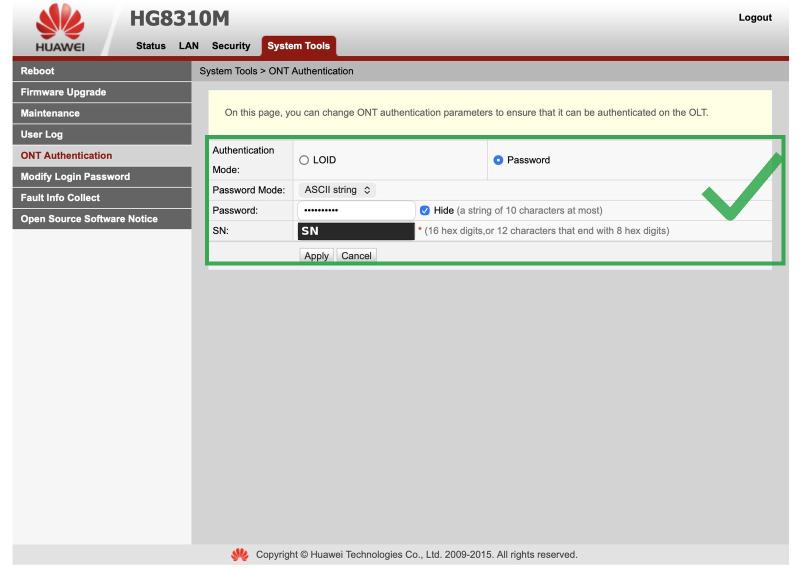
Leave the GPON serial number alone. Every documented Spanish success kept the ONT’s own serial; serial spoofing is a French and Polish complication that does not apply here.
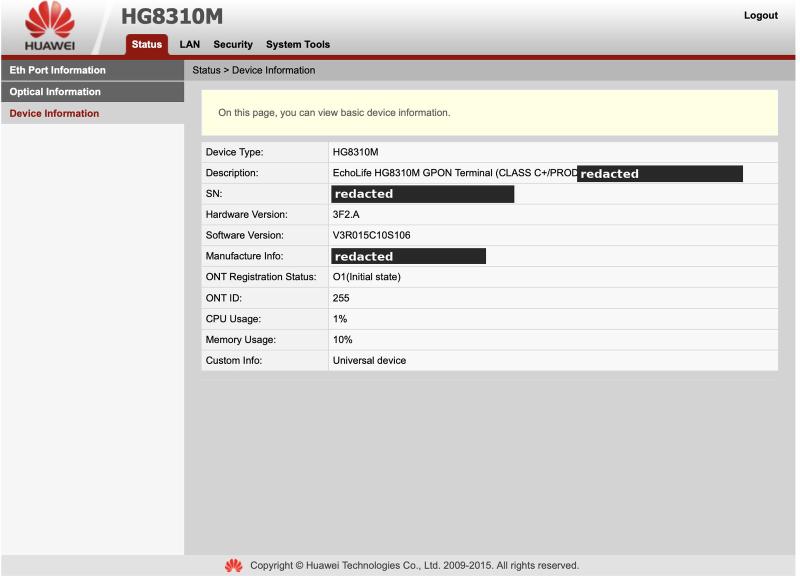
One more thing to check on the bench: my unit’s firmware (V3R015C10S106) has four tabs, Status, LAN, Security, System Tools. There is no WAN tab, which means the ONT cannot tag VLAN 832 itself. The OLT passes the VLAN through tagged, and your router has to handle it. This contradicts at least one widely shared guide that was actually written about the HG8120C, a different unit with a router inside.
How do you configure the router?#
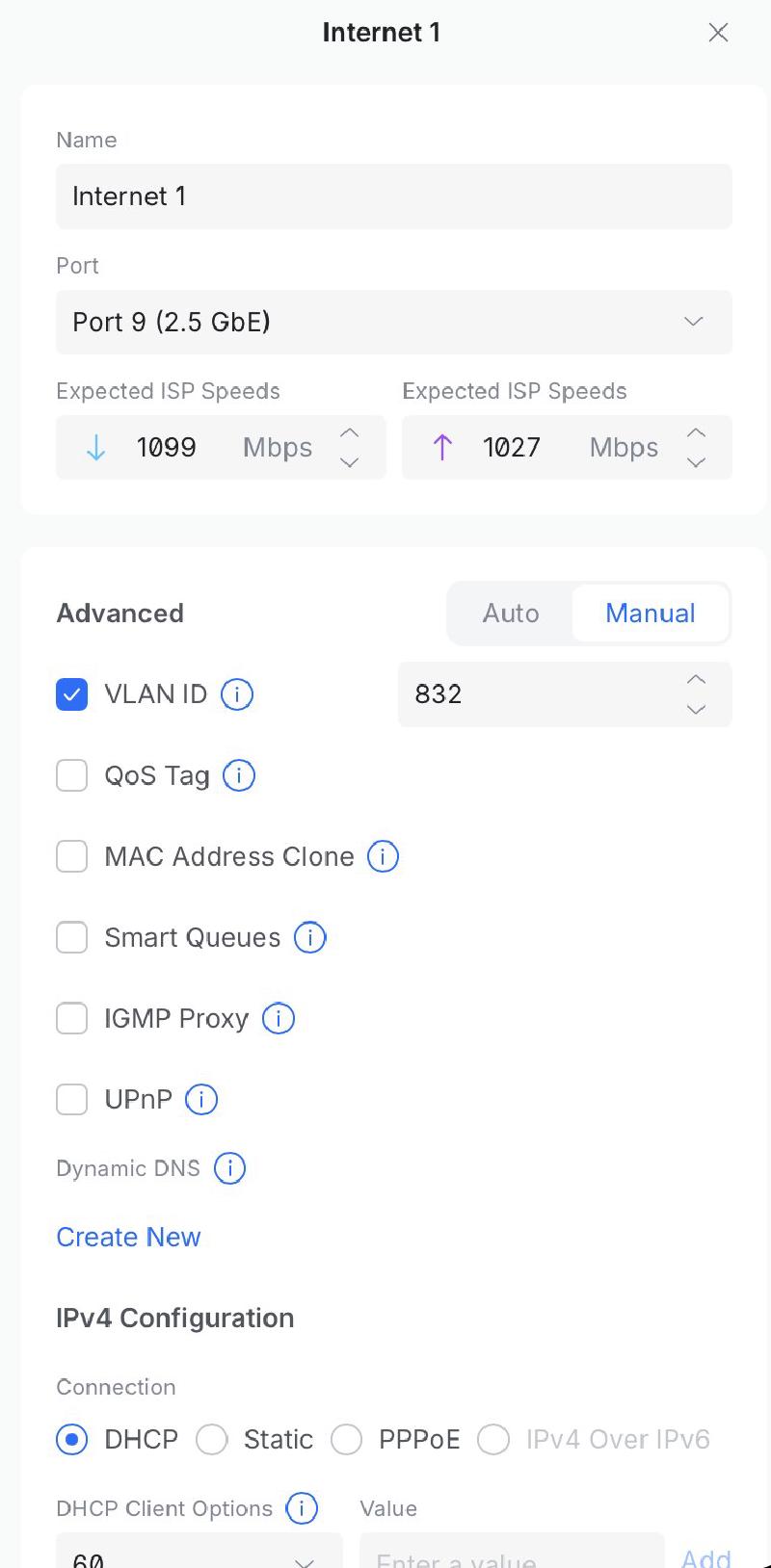
I run a UniFi Dream Machine Pro Max, so these are UniFi fields, but every serious router has the same four settings.
Settings > Internet > your WAN:
| Field | Value |
|---|---|
| IPv4 connection | DHCPv4 |
| VLAN ID | Enabled, 832 |
| QoS tag | None |
| DHCP CoS | None |
| MAC address clone | Off, unless no lease after 30 minutes |
| IPv6 | Off (Orange España residential fiber has none to give you) |
“None” on the two priority fields is correct. A tag sent without an explicit priority carries 802.1p 0, which is exactly what Orange España wants. Do not set the QoS tag to anything; it applies to all egress traffic and there are reports of a UDM dropping to 30 Mbps with it set. If you run OPNsense instead of UniFi, this bandaancha thread and this OPNsense forum thread cover the same VLAN 832 setup, the second one including the TV VLAN for a decoder.
You can do this while the Livebox is still live if you configure a spare router port as a second WAN, which turns the swap night into a cable move. I did it the simple way, on the primary WAN, during the outage.
What does the swap itself look like?#
In order, with my timestamps from 2 November:
- 12:25 Fiber out of the Livebox. Cap the Livebox optic. Inspect and clean the connector on the wall pigtail. Fiber into the Huawei, once. Every mate cycle on that SC/APC connector is wear on the one part you cannot replace yourself, so plug it in and leave it.
- Ethernet from the Huawei’s LAN port to the router’s WAN port, replacing the cable that went to Livebox port 1.
- 12:35 Huawei Status page shows O5 (Operation state). If it sits in O1 to O4 for ten minutes, then you have something wrong. Note the RX power.
- 12:54 Public lease visible on the UniFi WAN, once VLAN 832 was enabled on it. A
192.168.1.xaddress here means your tag is not being applied. - Check inbound from a phone on cellular. My Cloudflare-fronted services came straight back because the public IP had not changed.
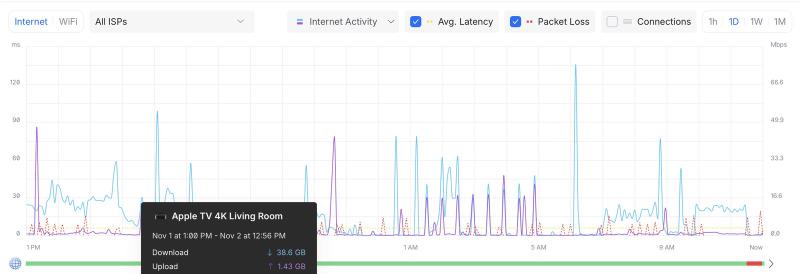
Then leave it alone and let your monitoring run. Mine kept logging latency and speed tests through the whole thing, which is where the numbers below come from.
What were the performance numbers?#
| Livebox 6 (53-day baseline) | Huawei HG8310M (day one) | |
|---|---|---|
| Download, median | 869 Mbps | 837 Mbps (one midday sample) |
| Upload, median | 893 Mbps | 840 Mbps |
| Latency to Microsoft / Google / Cloudflare | 13 / 13 / 5 ms | 13 / 13 / 5 ms |
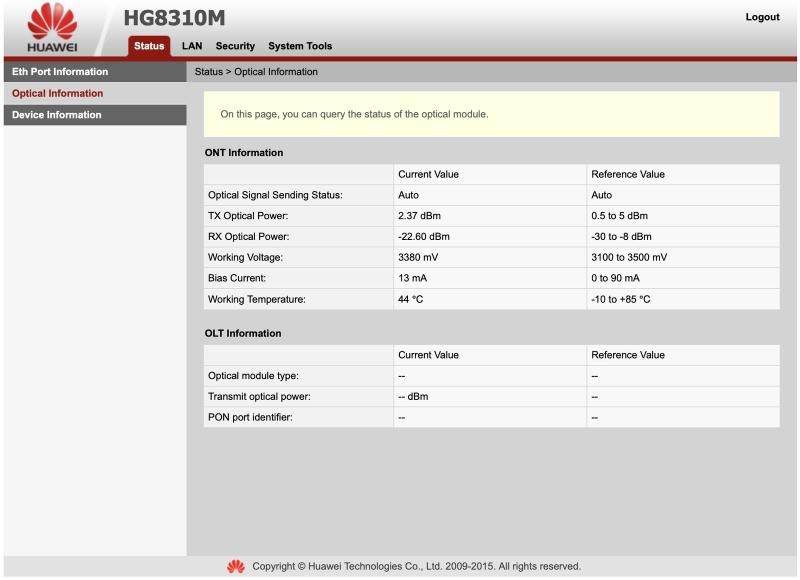
| Optical RX | -19.0 dBm | -22.6 dBm |
| Optical TX | +3.0 dBm | +2.4 dBm |
| Public IP | unchanged | unchanged |
| Reboots survived unattended | n/a | 1 (ONT power cycle, lease back in 5 minutes) |
The RX figure is the one I am watching. A 3.6 dB drop on the same fiber is more than I expected, and it is either the Huawei’s optic reading differently from the Livebox’s or a connector I did not clean well enough. It is comfortably inside the GPON receive window (the spec floor is around -27 dBm) and the error counters are at zero. So it stays until it drifts or errors appear.
One thing I did not plan: the Huawei shipped with a power supply with a really short cable. It wants 12 V, 0.5A, center positive, and the Livebox’s brick is 12 V, 2 A, center positive, so I just reused the already installed Livebox power supply. The five-minute outage at 13:00 on my latency graph is that swap.
What would I do differently?#
- Password mode, not LOID, from the start. That is the whole reason this post exists.
- Pre-configure the VLAN on a spare WAN port before the night. Then the outage is the length of a cable move, not 29 minutes.
- Clean the wall connector more carefully, or at least photograph the ferrule with a phone macro before plugging in. I would like to know whether that -22.6 is the fiber or the optic.
The bottom line#
If the Livebox is just converting light to Ethernet for you, a 15 euro HG8310M does the same job without the second router, the extra radios, the remote management, and the physical space. Copy the PLOAM password and the WAN MAC off the Livebox first, buy the ONT that matches your area’s OLT vendor, set Authentication Mode to Password, and tag VLAN 832 on your router’s WAN with no priority and plain DHCP. The landline will not work, the TV app does not notice, and the speed does not change.
Keep the Livebox. It is Orange’s, and the day you need support it is the first thing they will ask for.
Sources#
The Spanish fiber community on bandaancha.eu did most of the groundwork here. The threads I leaned on:
- Orange TV funcionando con ONT Huawei HG8310M, April 2026. The success report that made me buy this unit.
- ONT + router neutro sin perder la TV, April 2026. The HG8120C thread, useful for the TV VLAN, misleading on the HG8310M.
- Qué ONT son compatibles con OLT Nokia/Alcatel and Qué ONTs recomendáis. The OLT vendor question.
- Sacar clave GPON / ID ONT / PLOAM password and Solución: cambia la ONT, password Livebox 6.
- VLAN y prioridad por operadora. The table of VLAN IDs and priorities per Spanish ISP.
- OPNsense + Orange FTTH España con ONT propia and the ZTE DHCP follow-up.
- Orange TV Libre se abre a clientes de cualquier operador, bandaancha’s article on the app.
- hack-gpon.org, the reference for ONT default credentials and firmware quirks: Huawei HG8010H, Nokia G-010G-P.
- ADSLZone tutorial for the Nokia G-010G-P, if you end up on the Nokia path.
- OPNsense forum, Orange Spain FTTH with own ONT, December 2025. The best write-up of the decoder (VLAN 838) case, which I did not need.